Image to Video AI Generator
Turn a photo or reference image into a short AI video for TikTok, Reels, Shorts, and ads. Describe the motion, pick format and model, see credits first, keep videos private.
- Seedance · MiniMax H3 · Kling · Veo
- Portrait · Product · Social · Pitch
- 9:16 · 16:9 · 1:1
- 5s · 480p · 33 credits
Use Image to Video
Image to Video examples
Image to video demos with original images and motion results for social, product, portrait, and cinematic videos.
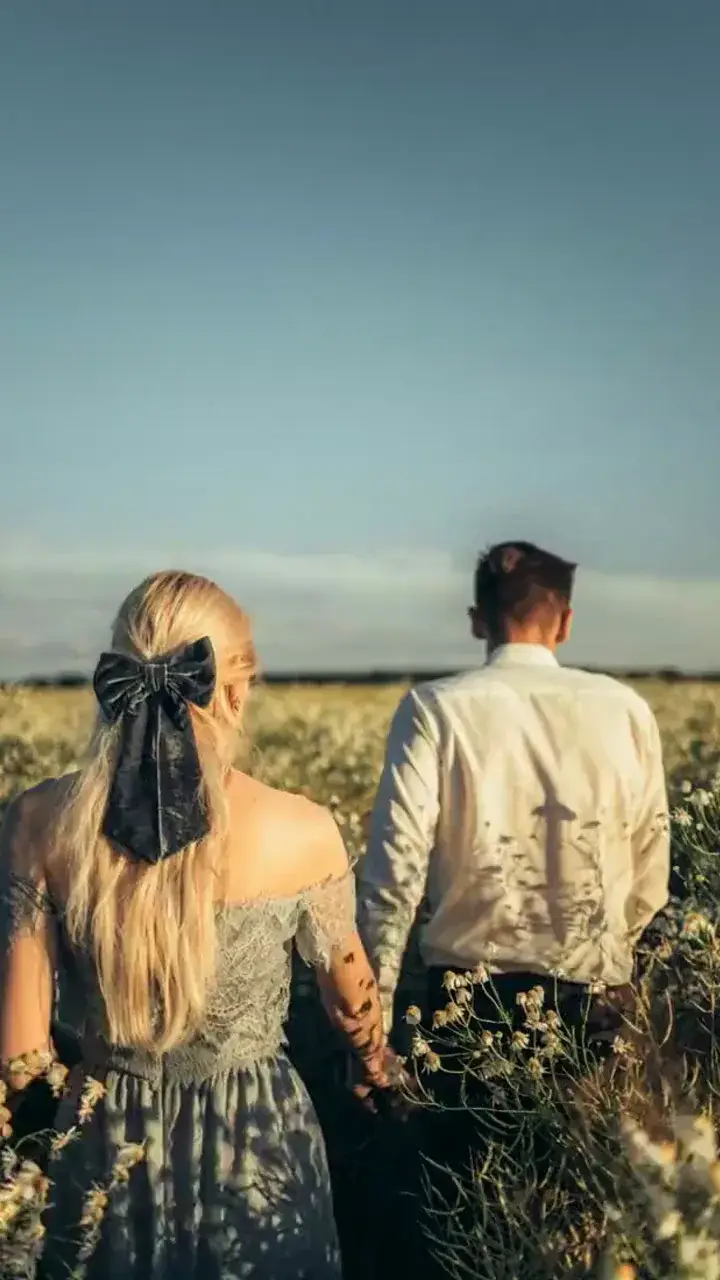
Vertical couple in flowers
Prompt
A couple playing hand in hand in the sea of flowers, gentle breeze through petals, slow tracking camera, warm daylight, natural footsteps and soft ambient sound.
Image to Video AI use cases
Animate portraits and photos
Turn portraits and lifestyle images into natural micro-motion for Reels, Shorts, and Stories.
Product showcase and launch videos
Animate product images into short motion for ads, listings, and launch teasers.
UGC-style social ads
Create creator-style product videos from images that feel natural for paid and organic social.
Why creators use MixVio Image to Video
Keep the look locked
Composition, subject, palette, and style stay rooted in your reference image. Motion, camera, and atmosphere layer on top—so the video feels directed, not redrawn.
Same image, switch models
Run one owned image across Seedance, Kling, Veo, or Gemini Omni Flash. Compare motion style on the same frame, then keep the take that matches the brief.
Formats ready to post
Set 9:16, 16:9, or 1:1 before you generate so the private video is ready for TikTok, Reels, Shorts, YouTube, or ads.
Image to Video AI models



How to turn an image into video
1. Upload your image
Start with a product image, portrait, or storyboard frame you own or are authorized to animate.
2. Describe the motion
Write the action and camera move (example: "slow push-in, fabric and hair in light wind").
3. Generate and download
Confirm the credit quote, generate, then download the private MP4, or open it in Create.
Image to Video Pricing
Explore more AI tools
Start from text, enhance a finished video, or sharpen artwork for delivery.

Image to Video AI FAQs
What is an AI image to video generator?
An AI image to video generator turns an image into a short video. On MixVio you start from a reference image you own, describe the motion you want, then generate a private MP4 for social, ads, or edits—no timeline editing required.
How do I turn an image into a video?
Three steps in the generator on this page. 1) Upload your image: a product image, portrait, or storyboard frame you own or are authorized to animate. 2) Describe the motion: write the action and camera move (example: "slow push-in, fabric and hair in light wind"), then set format and model. 3) Generate and download: confirm the credit quote, generate, and download the private MP4, or open it in Create.
Is MixVio Image to Video free?
Video generation is available on the Free plan when your balance covers the quote. The default 5-second 480p Seedance 2.0 video costs 33 credits. The quote changes with the selected model, duration, and resolution. Free delivery limits still apply, and failed runs cost no credits.
What image formats and output specs are supported?
Upload a JPEG, PNG, or WebP reference image. Public routes commonly support 9:16, 16:9, and 1:1, plus source-aware options on some Seedance routes. Output resolution depends on the model—many routes offer 720p, with 1080p or 4K on selected Seedance and Veo paths. Exact controls appear in the generator for the model you pick.
How long can my generated video be?
Most public image-to-video routes generate 3–15 second videos. Seedance 2.5 also supports a continuous 4–30 second take at 480p–1080p. Veo 3.1 Fast uses its own short duration set. Choose the length in the generator before you confirm credits.
Lock the image.
Generate the motion.
Upload an image you own, describe the motion, confirm credits, and download a private MP4.
Start generating videos