Seedance 2.5 AI Video Generator
30 seconds in one take. Up to 50 references. Native audio. Start from text, frames, or a reference pack, then confirm 4–30 seconds and 480p–1080p before you generate.
- From 38 credits
- 4–30s · 480p–1080p
- Text, frames, or references
- ByteDance · Seedance 2.5 docs ↗
Create with Seedance 2.5
Seedance 2.5 Video Examples
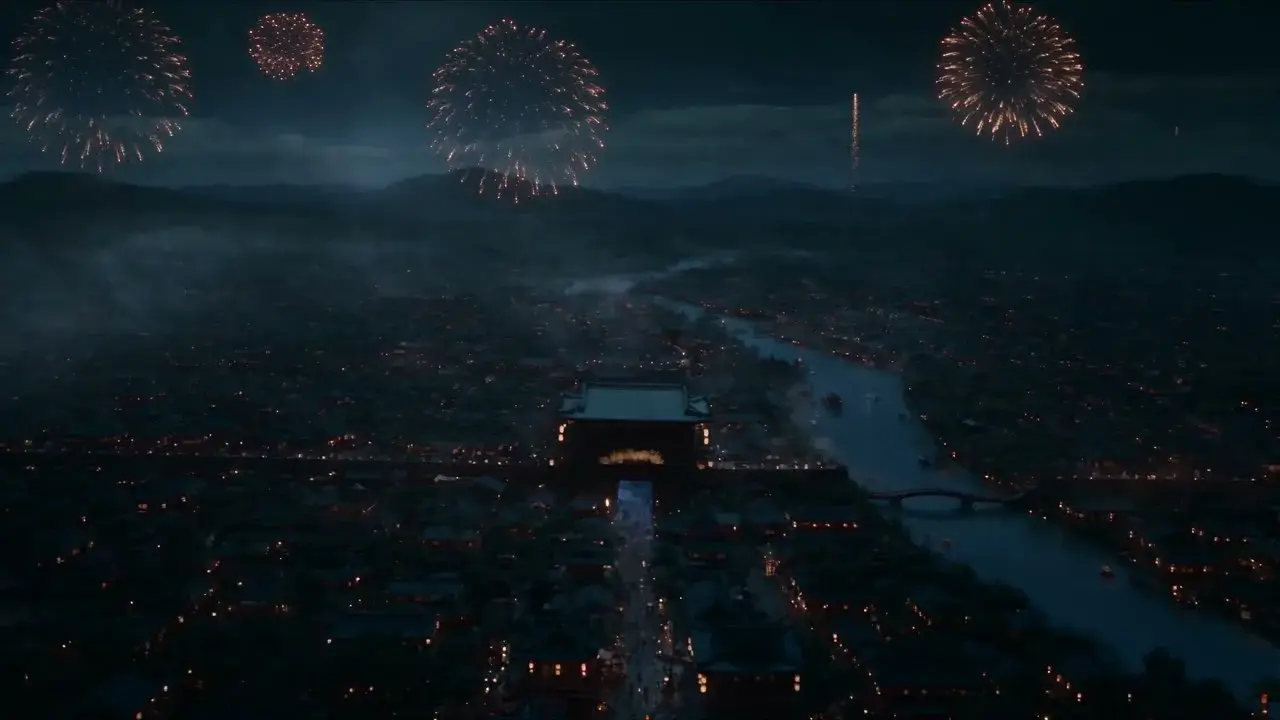
Lantern festival story
Prompt
Night aerial over a sprawling ancient Chinese city. Warm lantern grids trace tiled roofs and a winding river; golden fireworks burst above distant mountains. Cut to street level: a scholar in a dark teal robe and black futou walks into a lantern-lined crowd past women in pale hanfu and a large colorful parade lantern. End on a medium close-up of the scholar as lantern bokeh fills the night. Keep the festival glow and crowd density locked.
Key Features of Seedance 2.5
30-second storytelling
Tell a complete beat in one take. Seedance 2.5 holds setup, turn, and finish across a continuous 4–30 second clip—without stitching shorter takes.
How to Use Seedance 2.5
1. Start from text, frames, or references
Use text-to-video for a new scene, a first frame with an optional last frame, or multimodal for up to 30 images, 10 videos, and 10 audio—50 files total. First/last-frame and pack modes cannot be combined. Prefill from a demo if you want—nothing runs until you generate.
2. Direct motion, camera, and sound
Write subject, action, setting, camera, and sound. For a 4–30 second take, cover setup, turn, and finish—not a single frozen moment. Tag each file with @ImageN, @VideoN, or @AudioN and say what it provides; vague “use the references” often mixes roles.
3. Generate, review, then iterate
Select 4–30 seconds and 480p, 720p, or 1080p, confirm the credit estimate, then generate. Review identity, logos, dialogue, and lip sync before publishing or iterating.
Seedance 2.5 Pricing
Compare Seedance 2.5How Seedance 2.5 compares to other models
Seedance 2.5
This model4–30s one-takes, packs up to 50 files, and clay-render blocking
4–30s38–1320 credits
2–30s one-takes, 10/5/5 reference packs, and document or webpage input
2–30s12–660 credits
1–15s videos with native audio, a start photo, or up to 7 photo refs
1–15s6–264 credits
Seedance 2.5 FAQs
What is Seedance 2.5?
Seedance 2.5 is ByteDance Seed’s next video model for 4–30 second audio-video clips. On MixVio it creates one private clip per run from text, a first frame with an optional last frame, or a multimodal pack of images, videos, and audio. Seedance 2.5 announcement ↗
What is Seedance 2.5 best for?
Use it for a 4–30 second one-take, a large owned reference pack, clay-render blocking, or a product and character lock with native dialogue. Write the brief like a shot list—subject, action, setting, camera, and sound—and cover setup, turn, and finish on a longer take.
What inputs and file limits does Seedance 2.5 support?
Use Text to Video for a scene brief, Image to Video for one owned start frame with an optional end frame, or Multi Reference for owned packs: up to 30 images (≤30 MB each), 10 videos (MP4/MOV, ≤200 MB each), and 10 audio clips (MP3/WAV, ≤15 MB each)—up to 50 files total. Still images need 300–6,000 px on each side and a 2:5–5:2 crop; oversized photos are fitted automatically. Reference videos need 300–6,000 px per side, a 2:5–5:2 aspect ratio, 409,600–8,295,044 total pixels, and 24–60 FPS. Each reference video or audio clip is 2–30 seconds; each media type may total 30 seconds. Audio-only reference packs are supported. First/last-frame mode cannot be combined with a multimodal pack.
How do I tag references with @ImageN, @VideoN, and @AudioN?
After you upload files, mention each one by index in the prompt—@Image1, @Video1, @Audio1, and so on—and give it one job. Example: “Use @Image1 as the look. Match the camera in @Video1. Follow the beat of @Audio1.” Numbering follows upload order. Vague lines like “use the references” often mix roles.
Can I edit or extend an existing video with Seedance 2.5?
You can upload an owned clip in Multi Reference, tag it with @VideoN, and describe restaging, a camera change, or what should happen next. MixVio still returns one new private 4–30 second video per run. There is no separate public extend tool, in-place timeline editor, or multi-round session on the current MixVio routes.
Direct a 30-second one-take with Seedance 2.5.
Private. Credits shown first.
Start from text, frames, or an owned pack—including clay-render blocking. Confirm 4–30 seconds and 480p–1080p, then generate one private clip with native audio.
Create with Seedance 2.5 ↑