MiniMax H3 Max AI Video Generator
Faster 5–15-second MiniMax H3 Max videos from text, a first and optional last frame, or image, video, and audio references. Choose 480p, 768p, or 1080p with native audio. The faster H3 lane—not a 2K upgrade.
- Native audio
- 480p, 768p, or 1080p
- Text, frames, or references
- MiniMax · MiniMax H3 Max docs ↗
Create with MiniMax H3 Max
MiniMax H3 Max Video Examples
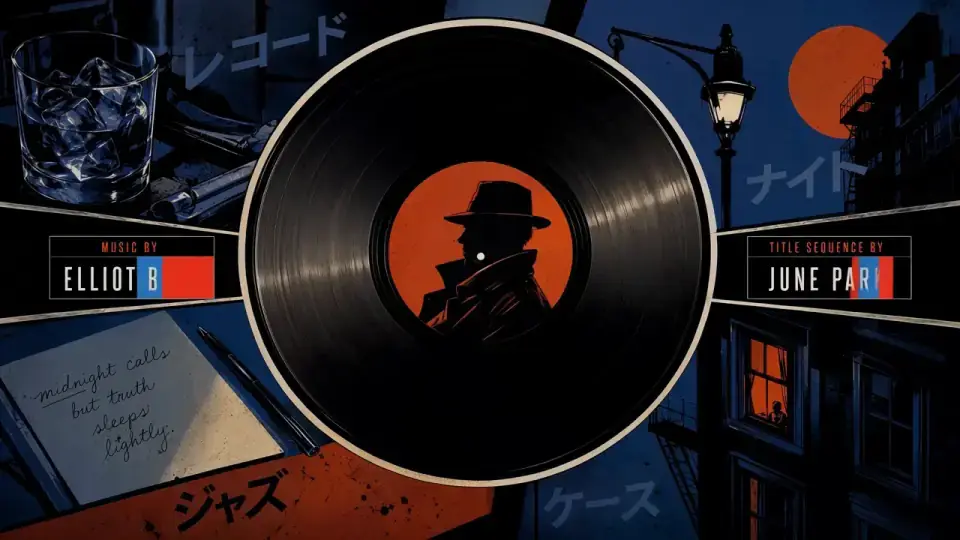
Opening titles
Prompt
Create a 15-second, 16:9 opening-title sequence for a stylish crime mystery. Draw from retro Japanese animation titles, hard-edged silhouettes, comic-book collage, asymmetric split screens, bold geometric color fields, English credit typography, sparse katakana accents, and a noir-jazz sensibility. Keep credits clean and legible.
Key Features of MiniMax H3 Max
Faster than H3
H3 Max is the speed lane for MiniMax H3—not a higher-resolution H3. Draft 5–15 second videos at 480p, 768p, or 1080p, then move to H3 when you need 2K.

How to Use MiniMax H3 Max
1. Start from text, frames, or references
Use text-to-video for a new scene, add an owned first frame with an optional end frame, or switch to multimodal mode for up to 9 images, 3 videos, and 3 audio files—12 files total. First/last-frame mode and the reference pack cannot be combined.
2. Direct motion, camera, and sound
Describe subject, action, camera movement, dialogue, ambience, and timing. In multimodal mode, use the composer’s @ImageN, @VideoN, and @AudioN tags so each file stays assigned.
3. Generate, review, then iterate
Select 5–15 seconds and 480p, 768p, or 1080p, confirm the credit estimate, then generate. Review identity, readable text, motion, dialogue, and lip sync before publishing. Move to MiniMax H3 when the cut needs 2K.
MiniMax H3 Max Pricing

Compare MiniMax H3 MaxHow MiniMax H3 Max compares to other models
MiniMax H3 Max
This modelFast 5–15s drafts with first/last frames or a 9/3/3 reference pack
5–15s12–199 credits
Multimodal reference, first/last frames, and instruction-led edits
4–15s3–32 credits
4–30s one-takes, packs up to 50 files, and clay-render blocking
4–30s19–651 credits
MiniMax H3 Max FAQs
What is MiniMax H3 Max?
MiniMax H3 Max is MiniMax’s faster H3 video lane. On MixVio it creates 5–15 second videos from text, a first frame and optional last frame, or image, video, and audio references at 480p, 768p, or 1080p with native stereo audio. MiniMax H3 Max ↗
Is H3 Max a higher-quality H3?
No. H3 Max is the speed lane. H3 remains the 768p / 2K route. 1080p on H3 Max is a refinement of a native 768p source. Choose H3 when the delivery needs 2K, or H3 Max when you want a faster 5–15 second draft.
What inputs and modes does MixVio support?
Use text-to-video for a new scene, first-frame image-to-video with an optional last frame, or multimodal reference-to-video for mixed files. First/end-frame mode and multimodal mode are mutually exclusive. In multimodal mode, mention each file with @ImageN, @VideoN, or @AudioN. Prompts can be up to 7,000 characters.
How many references can I add?
Up to 9 images (≤30 MB each), 3 videos (≤50 MB each), and 3 audio files (≤15 MB each), with no more than 12 files total. Still images need 256–5,760 px on each side and a 2:5–5:2 crop. Reference video and audio may total up to 15 seconds each; audio cannot be the only reference type.
Does MiniMax H3 Max generate native audio?
Yes. Every MiniMax H3 Max generation returns video with native stereo audio in the same pass. Describe dialogue, ambience, sound effects, or music in the brief. A reference recording can guide voice or atmosphere when it is paired with an image or video.
Start a MiniMax H3 Max video.
Private. Credits shown first.
Start from text, frames, or an owned reference pack, then generate with MiniMax H3 Max selected.
Create with MiniMax H3 Max ↑