Gemini Omni Flash AI Video Generator
Create short video with native audio from text or an owned image. Multimodal briefs, exact credits shown before generation, private 720p clips up to 10s.
- From 30 credits
- 720p video + audio
- Text + image to video
- Google · Gemini Omni Flash docs ↗
Create with Gemini Omni Flash
Gemini Omni Flash Video Examples
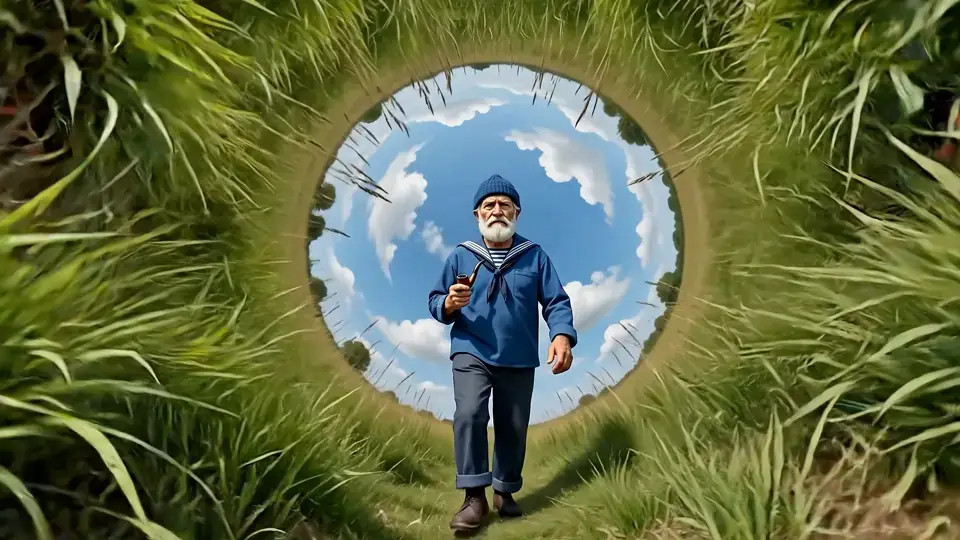
Multimodal walk-cycle restyle
Prompt
Referring to the extreme camera movement, perspective, and distortion in the motion reference, create a front-facing full-body walk cycle of the character from the image reference, quickly style-shifting into multiple visual styles during the walk cycle, starting from realistic cinema. Keep the environment, only change styles. Hard-cut backgrounds always centering the sky. Continuous walking, continuous audio, and style shifts in perfect sync to the beat of the audio. Cinematic, 16:9.
Key Features of Gemini Omni Flash
Multimodal reference
Guide the clip from text or an owned image. Combine a plain-language brief with owned references so subject, style, and staging stay under your control—not text-only guesswork.

How to Use Gemini Omni Flash
1. Start from text, image, or a clip
Write a text brief, add an owned image for reference-led motion, or upload a short owned clip for a single-shot edit. Prefill from an Example or Key Feature if you want—nothing runs until you generate.
2. Write motion, text, and sound
Describe the action, camera, on-screen text timing if needed, and native audio in plain language. Set duration (up to 10s), ratio (16:9 or 9:16), and keep output at the live 720p route.
3. Generate and review
Confirm the credit estimate, generate, then check motion and synced audio before downloading or refining the brief. Conversational multi-turn session editing remains Pending.
Gemini Omni Flash Pricing
Compare Gemini Omni FlashHow Gemini Omni Flash compares to other models
Gemini Omni Flash
This modelFast video concepts · Social stories
4–10s30–77 credits
4–15s cinematic clips with selectable 720p–4K
4–15s26–1260 credits
Social ads · Dialogue scenes
4–8s19–57 credits
Gemini Omni Flash FAQs
What is Gemini Omni Flash?
Gemini Omni Flash is Google’s multimodal video model for short clips with synchronized native audio. On MixVio, the reviewed public routes generate private 720p video from text, an owned reference image, or a single-shot owned source-clip edit. It is built for coherent motion, on-screen text timing, and knowledge-grounded scenes—not a separate Gemini 2.0 Flash chat model.
How long are Gemini Omni Flash videos, and what resolution is supported?
Public MixVio routes produce one private clip at 4, 6, 8, or 10 seconds at native 720p, typically in 16:9 or 9:16. The generator shows the exact duration and ratio options for the selected route. Higher-resolution output is not offered as a native Omni Flash route today—do not assume 1080p or 4K unless a separate upscale path is selected later.
Does Gemini Omni Flash generate native audio?
Yes. Live text-to-video and image-to-video routes return video with synchronized native audio. Describe dialogue, ambience, effects, or music in the brief, then review speech, mix, and timing before publishing.
Can I use an image or source video reference?
Yes. Use the image-to-video route with one owned still (JPEG, PNG, or WebP, ≤30 MB), one owned source clip, or one of each. MixVio accepts at most one image and one video on this public route. MixVio does not publish a separate pixel-size gate for Omni stills. Use only files you own or have permission to use, and review identity and continuity because details can still change.
Does MixVio support conversational multi-turn video editing?
Not yet on the public MixVio route. Google’s Gemini Omni product supports conversational multi-turn editing in supported Google surfaces, but MixVio currently offers single-shot generation and single-shot source-clip edit only. Multi-turn session editing remains Pending until a Provider session contract passes review.
Start your Gemini Omni Flash scene.
Private. Credits shown first.
Start from text or owned references, then generate with Gemini Omni Flash selected.
Create with Gemini Omni Flash ↑