Seedream 5.0 Pro AI Image Generator & Editor

Create dense layouts, native multilingual boards (14+ languages), ecommerce heroes, and region-aware edits from a text brief or up to 10 owned references—with selectable 1K–2K output and exact credits shown before you generate.

  • ByteDance · source ↗
  • 14+ languages
  • Multi-ref edit
  • From 12 credits

Create with Seedream 5.0 Pro

Made with Seedream 5.0 Pro

See dense layouts, multilingual boards, photoreal scenes, and before/after region-aware edits made with Seedream 5.0 Pro. Use Try to prefill—nothing submits or charges until you generate.

Key Features of Seedream 5.0 Pro

Native multilingual text, dense layouts, region-aware edits, and campaign hierarchy—each with a matching demo. Prefill any row; nothing runs until you generate.

Native multilingual text

Render in-image copy across 14+ languages—including CJK, Arabic RTL, and accented Latin scripts—so posters, menus, and safety boards stay readable without repairing broken letters.
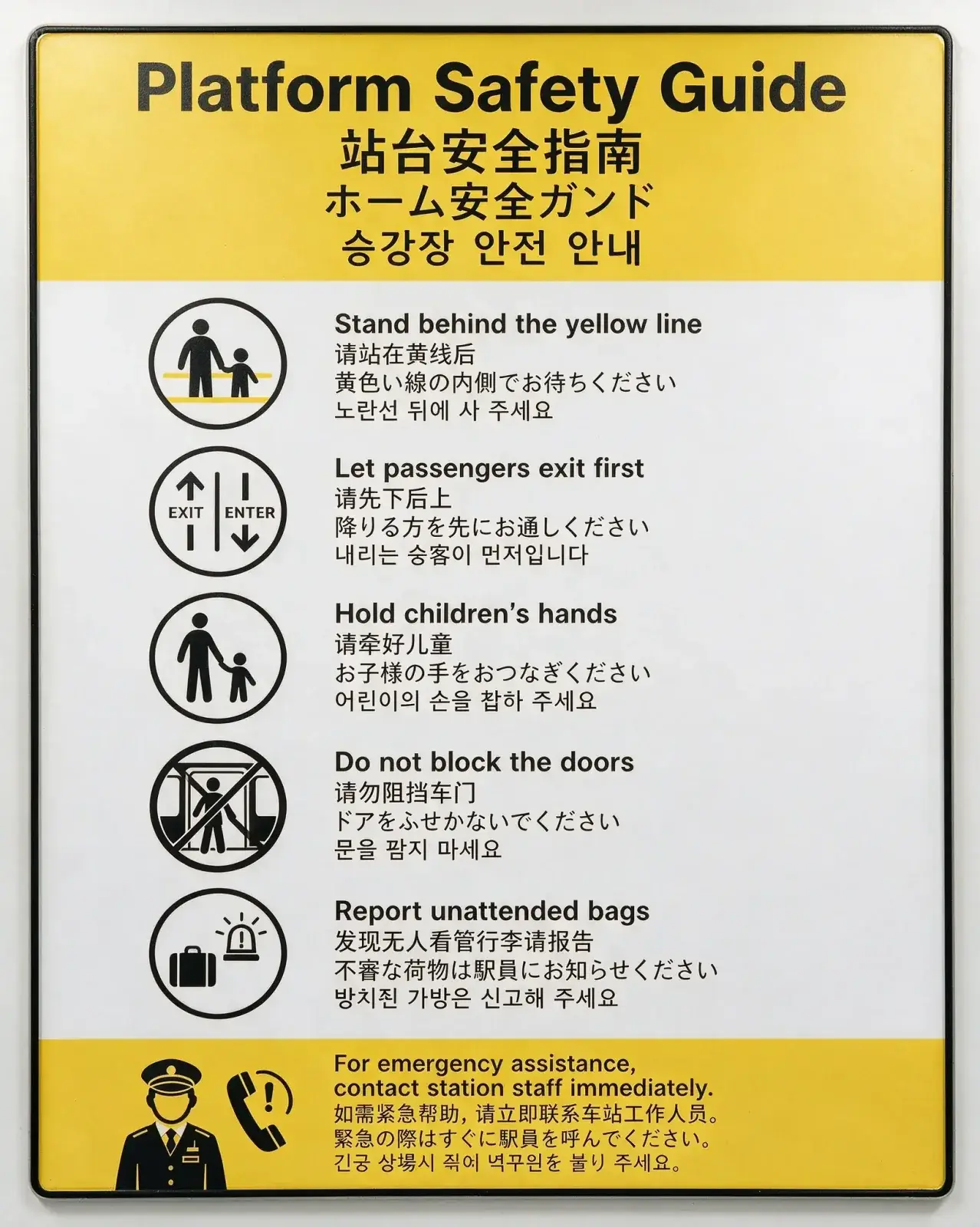
Seedream 5.0 Pro example: multilingual platform safety guide poster
Seedream 5.0 Pro example: Thai restaurant menu with readable dish labels

Dense layouts

Pack dashboards, blueprints, charts, and reading order into one information-rich still—so RPG UIs, tech drawings, and explainer boards stay scannable instead of cluttered.

Seedream 5.0 Pro example: dense RPG character dashboard UI

Region-aware edits

Describe a regional change in plain language—or mark the target on an owned reference—and keep the rest of the frame intact. Fuse up to 10 owned references when you need product, logo, or style anchors.

Seedream 5.0 Pro example: English Family Health Clinic poster before localizationBefore
Seedream 5.0 Pro example: Arabic RTL Family Health Clinic poster after localizationAfter

Layout control

Compose magazine covers, ecommerce heroes, and campaign boards with clear hierarchy, exact headlines, and product placement—not just a single styled subject.

Seedream 5.0 Pro example: SaaS website hero with headline, CTAs, and product UI hierarchy

How to Use Seedream 5.0 Pro

Three steps from brief to a reviewable image—then edit when you need a region-aware or multi-reference change.

  1. 1

    Start from text or references

    Open Seedream 5.0 Pro with a text brief, or add one to ten owned images for the image-edit route. Prefill from a Key Feature or Example if you want—nothing runs until you generate.

  2. 2

    Spell out text, layout, and settings

    Write exact headlines, multilingual labels, panel structure, materials, and any surgical changes in plain language. For multi-reference edits, refer to Figure 1, Figure 2, and so on. Set ratio and 1K or 2K resolution for the delivery you need.

  3. 3

    Generate, review, then edit

    Confirm the credit estimate and generate. Check readable text, hierarchy, and identity, then download—or continue on image-edit to change only what you ask while the rest of the frame holds.

Seedream 5.0 Pro Pricing

From 12 credits per image on the published route. Free is a watermarked preview; paid plans add monthly credits, with the exact quote shown before every run.

How Seedream 5.0 Pro compares to other models

Attribute
This modelSeedream 5.0 Pro
Best forConsistency-heavy professional editing and typographyStrict prompts, premium edits, high-resolution finalsFast balanced generation and editing with strong general knowledge
Text renderingExcellentStrongStrong
Image editingExcellentExcellentExcellent
Multi-image referencesStrongStrongStrong
PhotorealismExcellentExcellentStrong
SpeedMediumMediumExcellent
Max resolution1K–2K1K–4K1K–4K
Credits12–32 credits3–72 credits per output14–28 credits per output

Seedream 5.0 Pro FAQs

What is Seedream 5.0 Pro?

Seedream 5.0 Pro is ByteDance’s frontier image generation and editing model. On MixVio you can start from a text prompt or owned references, then generate or continue with a region-aware natural-language edit—credits shown before you run.

What is Seedream 5.0 Pro best for?

Use it for dense layouts, native multilingual in-image text (14+ languages), campaign boards, ecommerce heroes, and region-aware professional edits—including multi-reference fusion—where hierarchy and readable labels matter as much as the look.

Can Seedream 5.0 Pro generate dense infographics and layout boards?

Yes. Dense dashboards, menus, posters, and campaign boards with clear reading order are a core strength. Still review tiny labels, chart numbers, and brand spelling before you publish.

Can Seedream 5.0 Pro render readable text, including multilingual copy?

Yes. Native multilingual rendering is a core strength across 14+ languages—including Chinese, English, Japanese, Korean, Arabic, Spanish, French, German, and more—with typography that follows local reading direction. Still review fine print, spelling, brand names, and dense body text before you publish.

Can I edit only part of an image?

Yes. Upload one to ten images you own or have permission to use, then describe the regional change in plain language—or mark the target region in a reference. MixVio routes to the Seedream 5.0 Pro edit path. For multi-reference fusion, refer to Figure 1, Figure 2, and so on in the prompt. Mask painting is not exposed as a separate canvas tool yet, and unrequested details can still shift, so review before publishing.

Does MixVio support Seedream layer separation?

ByteDance Seedream 5.0 Pro can separate a design into transparent layer stacks on Provider Layerize routes. MixVio’s public Seedream routes today focus on generate and region-aware edit (including up to 10 reference images). Layer-stack export remains Pending until credits, multi-output archive, and end-to-end review are verified.

Which resolutions and aspect ratios does MixVio support?

Text-to-image supports 1K and 2K with auto, 1:1, 4:3, 3:4, 4:5, 16:9, and 9:16. Seedream 5.0 Pro on MixVio does not expose 4K—use Seedream 5.0 Lite when you need 4K drafts. Editing supports selectable 1K or 2K output from one to ten owned references.

How many credits does Seedream 5.0 Pro use?

Text generation uses 12 credits at 1K or 23 credits at 2K per output. Editing uses the same base price, with the exact quote updated when additional reference images are added. Output count (up to four on text-to-image) updates the total. Failed or canceled runs release the reservation automatically.

How does Seedream 5.0 Pro compare with GPT Image 2 or Nano Banana 2?

Choose Seedream 5.0 Pro for consistency-heavy professional editing, dense typography, and multilingual boards at 1K–2K. Prefer GPT Image 2 for strict prompts, premium edits, and high-resolution finals up to 4K, or Nano Banana 2 for faster balanced generate-and-edit loops. Use the comparison table on this page for live Best for, grades, resolution, and credits.

Can I use Seedream 5.0 Pro outputs commercially?

The route supports commercial workflows, subject to current ByteDance / Provider terms and your rights to every prompt and reference image. Outputs are not guaranteed to be exclusive or cleared for trademarks or likenesses.

Are my prompts and outputs private on MixVio?

Yes. Prompts are routed server-side, and final media is archived privately to your workspace—not exposed in public URLs or client logs. Keep private prompts and asset IDs out of shared links.

When should I choose Seedream 5.0 Pro instead of Seedream 5.0 Lite?

Choose Seedream 5.0 Pro when dense layouts, multilingual in-image text, or region-aware edits need its frontier quality tier at 1K or 2K from 12 credits per image. Seedream 5.0 Lite is the faster sibling for text-led social graphics and campaign drafts at 6 credits, and the one to pick for 4K output. The generator shows each route’s exact credits before submission.

Create dense, edit-ready stills with Seedream 5.0 Pro.
Private. Credits shown first.

Start from text or an owned reference for dense boards, multilingual posters, or region-aware edits—then generate with Seedream 5.0 Pro selected.

Create with Seedream 5.0 Pro

Your privacy choices

Choose whether MixVio can use optional analytics to improve the product and referral cookies to credit partners. We don’t sell or share personal information for targeted advertising. Learn more.